
The Das Keyboard 'Prime 13' & '4 Professional' Mechanical Keyboard Review
The Das Keyboard Prime 13 Mechanical Keyboard
The Das Keyboard Prime 13 shares the same postmodern design of the Das Keyboard 4 Professional, with an aluminum top cover and a plastic lower frame. The company logo is printed at the top right corner of the aluminum cover, in only white color this time. In essence, the Das Keyboard Prime 13 is aesthetically almost the same as the Das Keyboard 4 Professional, except from the missing sound volume wheel and the multimedia buttons. However, beyond aesthetics, there are several practical differences between the two keyboards.

We received the US layout version of the Das Keyboard Prime 13. It is a standard 104-key keyboard that fully adheres to the ANSI layout, with a normal bottom row. The bottom row of the keyboard has a 6.25× Spacebar and seven 1.25× bottom row keys. The left "Windows" key has the Das Keyboard company logo printed on it. The right "Windows" key has been replaced with the "Fn" key that can be used to access advanced functions via keystrokes.
The keycaps of the Das Keyboard Prime 13 have laser etched characters that, in comparison to the Das Keyboard 4 Professional, are significantly larger and moved towards the top center of the keycap. This was the reasonable thing for the designer to do, as the Das Keyboard Prime 13 features LED lighting and reasonably sized characters right above the position of the LED are a necessity.


Much like the Das Keyboard 4 Professional, the Das Keyboard Prime 13 has no macro keys and no programmability options. The extra few multimedia buttons and the volume control wheel are now gone too, with the extra functions that the Das Keyboard Prime 13 capable of performing being accessible via keystrokes. By holding down the Fn key, pressing F1/F2 controls the brightness of the backlighting, F5-F7 offer basic multimedia controls, F9-F11 control the sound volume and the ESC key puts the computer to sleep.

Unlike its more expensive counterpart, the Das Keyboard Prime 13 has only one USB port at the rear top right corner of the keyboard. The port not only is USB 2.0 but it also requires an extra USB connector at the PC's side, as the thick braided cable of the Das Keyboard Prime 13 splits to two USB connectors, one for the keyboard itself and one for its USB port. If the USB port is not going to be used, then the keyboard will function normally with just its main USB connector inserted.

Again, beneath the keycaps we find original Cherry MX switches. This time however the switches have LEDs attached. We also found that Das Keyboard switched to cross-type Cherry stabilizers for all of the keys, which hints that the designer expects that the target group of this keyboard will at least try and remove the keycaps, even if only for cleaning.

The white backlighting of the Das Keyboard Prime 13 is very well applied and stunningly bright. With the LEDs at their maximum brightness, using the keyboard in a very dark room is practically intolerable. A very slightly blueish hue spills around the keycaps, the effect of which is largely enhanced by our camera's lens, from the light bouncing on the black steel plate beneath the keys. We should also mention that the switches of the ESC row have been placed upside down, illuminating the advanced commands that are etched on the front side of the keys. This was an excellent design choice and the visual effect is excellent when viewing the keyboard on a desktop. We should also note that the LEDs will automatically switch off after 10 minutes of inactivity and come back on once a key has been pressed.

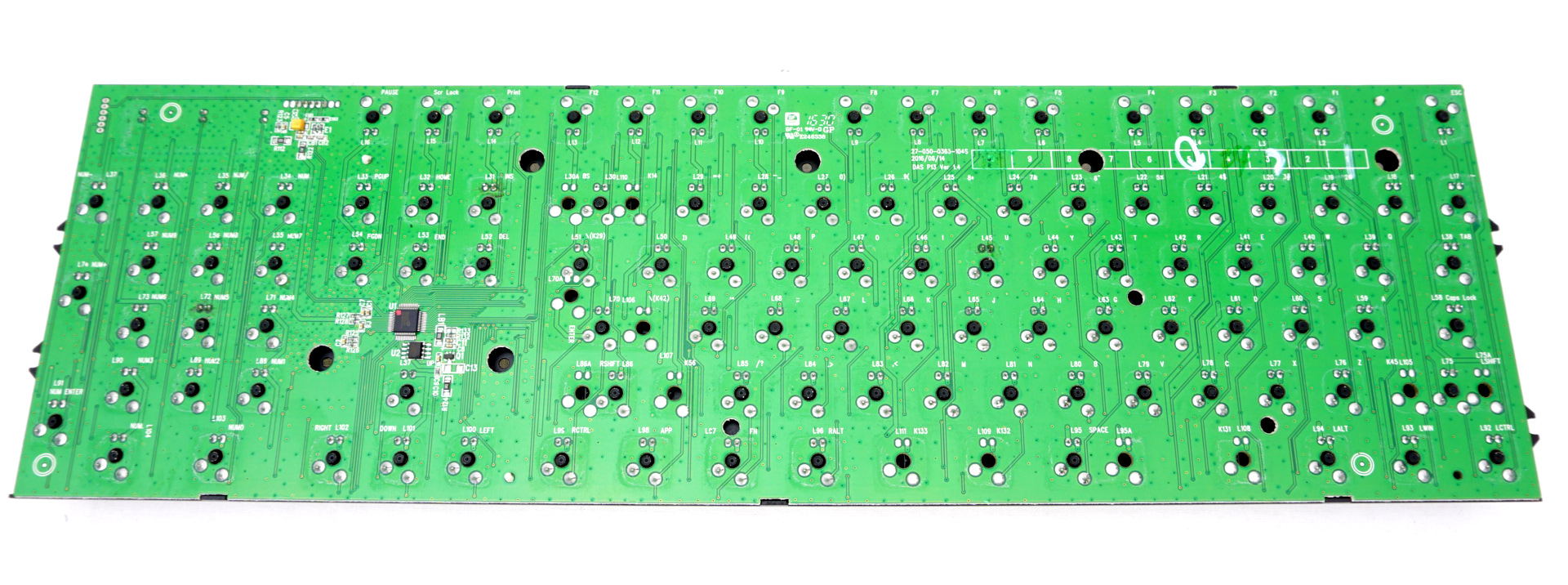
Internally, the Das Keyboard Prime 13 has only one PCB, which also is entirely different than that of the Das Keyboard 4 Professional. We noticed no significant quality shortcuts, with the assembly job and materials being of excellent quality. The significant downgrade is the Holtek HT68FB560 microcontroller. With an internal clock of 12 MHz and 16 KB of flash memory, it seems to be majorly inferior to the Nuvoton microcontroller that the Das Keyboard 4 Professional is using, yet it still is more than enough for a keyboard without any programmability options.

Originally published at https://www.anandtech.com/show/10865/das-keyboard-4-professional-prime-13 (Wayback Machine).