
Intel Centrino/Pentium-M Notebook Roundup: Dell, FIC and IBM Examined
- Posted in
- Laptops
FIC Centrino - Build, Appearance, Size
Another notebook producer on the list of Pentium M launch partners is FIC who
will likely be ODMing (ordinal design manufacturering) for various companies.
We have not had a chance to look at any FIC notebooks to date (although we did
get our hands on their

From the outside the system looks and feels a lot like an Apple PowerBook. It is sleek and elegant with dark colors almost all the way around. The system is outfitted with a 14.1" TFT LCD panel that supports a max resolution of 1024x768 (XGA). We would have liked to see a higher resolution display in place, an SXGA or SXGA+ panel for example, but as this is an engineering unit it is very possible that the production FIC units will feature higher resolution displays.
The speakers on the FIC Centrino notebook are located on the monitor portion of the notebook below the LCD panel. This was surprising to see considering how thin the LCD panel is but is a wonderful place for speakers as sound is directed exactly where you are looking. In addition the speakers are not easily blocked by hands or wrists like some other speaker locations.
The keyboard on the FIC Centrino notebook is similar to the keyboards found on other Taiwanese notebooks we have seen, namely from ECS. The keyboard is full sized, offers dedicated arrow keys, and has fairly good key travel and tactile response (although we would call it a bit lower quality than the keyboard on the Dell and IBM systems). The control key on the keyboard is in the proper location (the far left key) and the keyboard features a Windows key as well.
We did have one problem with the keyboard on FIC's Centrino solution: only about half the keys worked. As an engineering unit this is not unheard of but it just goes to show you that the system is not yet ready to hit the store shelves. Thank goodness for USB keyboard support.

Mouse support is provided via a touch pad located below the keyboard. The touch pad was fairly standard in size and offers good sized buttons with excellent tactile response. Between the left and right mouse buttons is a scroll button rocker which can scroll up and down a current page.

There are a row of status LEDs located on the screen area below the LCD and between the speakers. The LEDs indicate power state, battery status, hard drive activity, wireless status, caps lock, scroll lock, and number lock.
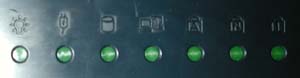
There are also two status LEDs on the back of the LCD panel which are visible when the system is closed. These LEDs indicate power state and wireless connection status (if the wireless receiver is on or off).

Above the keyboard is the power button, the circular button in the center of the unit. There are also two access buttons to the left, one for launching the default internet browser and one for launching the default mail application.
Originally published at https://www.anandtech.com/show/1084 (Wayback Machine).