
Intel Centrino/Pentium-M Notebook Roundup: Dell, FIC and IBM Examined
- Posted in
- Laptops
Dell Latitude D800 - Build, Appearance, Size
The first manufacturer we will look at with a Pentium M solution is Dell. Dell took advantage of the Pentium M launch to not only produce a notebook based on the processor but to also restyle their existing solutions. With the Pentium M, the Dell Latitude series notebook gets its first major facelift in years. The final product is the Dell Latitude D800, a full featured notebook that looks nothing like the Latitude C840 it replaces (this is a good thing). Sleek, silver and stylish are all words that come to mind. The system is a full Centrino solution, as it uses the Intel Pentium M processor, 855PM chipset, and Intel wireless card to produce one powerful notebook solution.
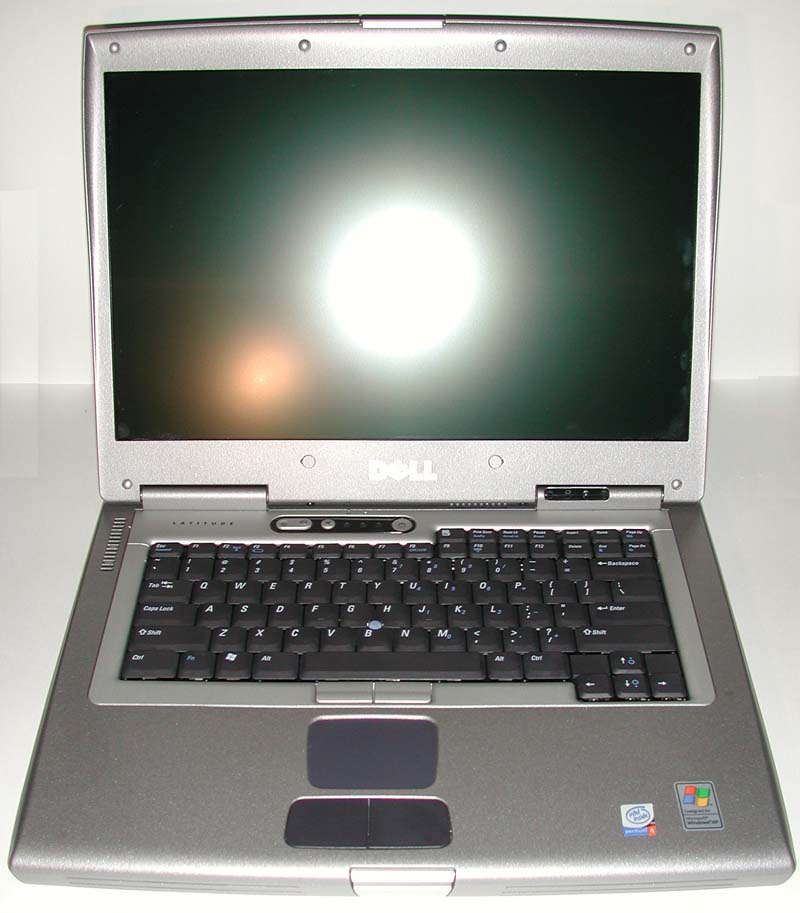
The first thing that will likely strike you about the Latitude D800 is its
display. Unlike your standard PC notebook display or LCD panel and more like
an Apple flat panel, the Dell Latitude D800 is outfitted with a 15.4" wide
screen display (16:10). The display, which runs at 1920x1200 (WUXGA) in the
highest end D800 and 1280x800 (WXGA) in the two lower end models, is truly breath
taking. At 1920x1200 the panel, which utilizes
Not only does the WUXGA display look nice, it also provides for an increase
in functionality over standard aspect ratio LCD panels. The 15.4" WUXGA
display provides 20% more desktop surface than a standard 15" UXGA screen.
This means that it is now possible to easily view two Microsoft Word pages at
once or a full Word page on one side and a full Internet Explorer window in
the other. No more
We suspect that Dell is onto something here with the wide screen display on the Latitude D800. Do not be surprised if you see more and more laptops come with a wide aspect LCD and more and more desktop LCD panels be offered in wide aspect ratios as well. We would love to configure our desktop with a display like the WUXGA screen on the Latitude D800.
To accommodate the 15.4" wide screen display the Latitude D800 is wider than any other notebook we have gotten our hands on. The majority of notebooks we have seen are square or nearly square in design. Thanks to its wide screen panel, the Latitude D800's footprint is a rectangle, with the width being 3.3 inches greater than the length. This accounts for the space around the Latitude D800's full sized keyboard.
The keyboard on the Latitude D800 includes all the keys we have come to expect from notebook keyboards including dedicated arrow keys in the lower right corner. The control key on the keyboard is in the standard location (far left) and is separated from the Windows key by the function key. The keyboard felt pretty standard, with a good amount of travel for a notebook keyboard and good tactile response.
Mouse input is provided by the "DualPoint" integrated pointing device. Like the Latitude C840 that it replaces, the DualPoint input system consists of both a touch pad and a track stick. Each input device has its own set of buttons and both sets have been revamped on the Latitude D800 to make them more responsive. We especially liked the new buttons tied to the track stick, although we did find them to be somewhat picky with where we pressed down to enable a click.
One thing that the D800 is missing is a scroll button of some sorts. This feature is also missing from the Latitude C840 that the system replaces.

Four status LEDs are found below the monitor on the monitor hinge. This allows the LEDs to be seen both with the screen open and with the screen closed. Here one can see power state, hard drive activity, battery state, and Bluetooth status.

The additional status LEDs are found above the keyboard. These lights indicate key states (number lock, caps lock, and scroll lock). To the right of these LEDs is the system's power button and to the left is a mute button followed by a volume up and a volume down button; welcome additions to the Latitude line. The microphone lies right above here, out of the way of our hands but also somewhat far away from the source of noise (our head).

Also visible with the screen open are two cooling vents. The first of these is located on the back left side of the system's top in the area to the left of the keyboard. This vent supplies cool air to the CPU fan which lies below here. The second vent is barely visible and located below the monitor along the gap between the monitor and the top of the system. This vent is an exhaust vent for a second cooling fan that the D800 employs (for what, we will have to wait and see).
Originally published at https://www.anandtech.com/show/1084 (Wayback Machine).