
GIGABYTE BRIX Gaming UHD GB-BNi7HG4-950 mini-PC Review
Concluding Remarks
The BRIX Gaming UHD, like most other mini-PCs, is a notebook platform (in this case, a gaming one) in a desktop form factor. The GPU is decidedly mid-range, particularly when compared against the GTX 980 in the Zotac ZBOX MAGNUS EN980. Thanks to NVIDIA's requirements with respect to discrete GPUs in mini-PCs, GIGABYTE is unable to market the GPU with its correct tag - a GTX 965M based on the GM206M Maxwell platform. Instead, we have to put up with a 'GTX 950'. Our gaming benchmarks prove that the system performs better than equivalent notebooks - pointing to the ability to sustain higher clock rates without getting power limited.
As we reach the business end of the review, let us get the positives out of the way before discussing aspects that GIGABYTE could improve.
The 45W TDP CPU (Core i7-6700HQ) is one of the high-end options in the Skylake family, and it provides the system with plenty of processing horsepower. Performance for CPU-bound workloads is as good as that of the Skull Canyon NUC.
The chassis and cooling system design is, without doubt, the best amongst all the mini-PCs we have evaluated so far. The fan placement ensures that we have airflow across all the board components (including the 2.5" drives). The idling temperatures for the various board components are below 30C. The relatively large fan (compared to the previous BRIX Gaming unit) and its low speed ensure that the noise profile is, subjectively speaking, one of the best in its class. The single fan is also able to ensure that the system doesn't throttle even under artificial power-virus loads.
On the networking side, GIGABYTE must be given credit for going with an Intel Gigabit LAN controller. The WLAN subsystem comes with an external antenna that can be placed away from the main unit (and oriented as required). This ensures that the placement of the main unit does not necessarily need to hinder the wireless performance of the system.
The HTPC aspects of the system are quite interesting - the unit is capable of HEVC Main10 decode with complete hardware acceleration, and GIGABYTE advertises 4Kp60 HDMI output. The product also comes with a UHD tag to stress the fact that all four display outputs are capable of simultaneously driving 4Kp60 streams. Beyond that, we would like GIGABYTE to specifically advertise HDMI 2.0 capability and also touch upon whether the unit supports HDCP 2.2 (Update: GIGABYTE clarified that the unit only supports HDCP 2.0). We couldn't evaluate this particular aspect (our review focused on metrics using a 1080p display as that is the common baseline across all the mini-PCs that we evaluate).
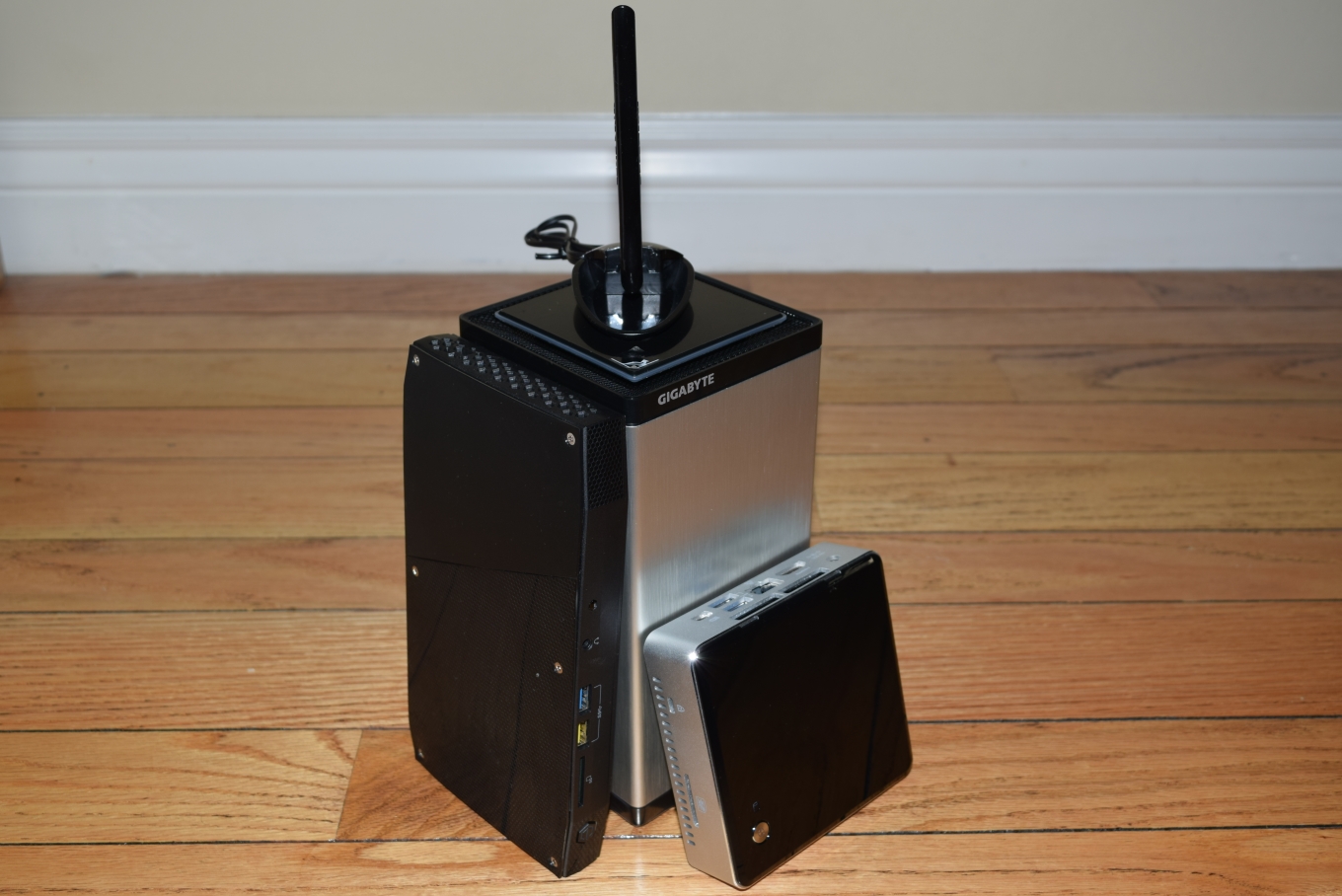
GIGABYTE BRIX Gaming UHD Size Comparison
Intel Skull Canyon NUC6i7KYK (L) and the Intel NUC6i5KYK (R)
In terms of scope for improving the GB-BNi7HG4-950, GIGABYTE needs to look into four different aspects. We address them one by one below.
The Maxwell - Pascal Debate
There is no issue with having a Skylake CPU (quad-core Kaby Lakes in the 45W TDP range have not been launched yet) in the system. However, it is a bit disappointing that the PC is using the last-gen 28nm Maxwell GPU. NVIDIA's 16nm / 14nm Pascal generation has been making waves in the gaming market for huge improvements in the performance per watt metric. We hope that GIGABYTE releases a Pascal GPU version soon. That move should also help them do away with the usage of mobile GPUs rebadged as desktop GPUs.
Motherboard Design - PCIe Lane Allocation
The other aspect to note is the division of PCIe lanes from the processor. While high-end gaming mini-PCs like the Zotac ZBOX MAGNUS EN980 opt to devote all 16 direct PCIe lanes to the discrete GPU, GIGABYTE has taken the decision to use only 8 for that purpose. This, by itself, is probably a good decision since a mid-range GPU like the GTX 965M is not likely to benefit a lot from a wider communication link with the CPU. However, we are not completely happy with the way the other PCIe lanes from the CPU have been utilized (four unconnected, and four for a M.2 PCIe 3.0 x4 SSD slot). Considering the system as a whole, we see two PCIe lanes from the HM170 Sunrise Point PCH being used to enable the two USB 3.1 Gen 2 ports via the ASMedia ASM1142 bridge chip. We would like GIGABYTE to get rid of this component. Instead, an Alpine Ridge Thunderbolt 3 controller could be connected directly to the CPU's unused PCIe lanes to enable two Thunderbolt 3 / USB 3.1 Gen 2 Type-C ports. Thunderbolt 3's versatility over the USB 3.1 Gen 2 ports from the ASMedia bridge chip are definitely needed at the price point being targeted by GIGABYTE for this system.
Chassis Design and I/O Ports Placement
The chassis design enables excellent thermal characteristics when coupled with the fan. However, we do get the feeling that the chassis has been over-engineered. Disassembling the kit for installation of the RAM and drive(s) is definitely not as easy as what we have been used to with the BRIXs and the NUCs. Consumers purchasing a barebones unit would do well to go through the installation manual and/or the YouTube video before attempting to complete the build. From a I/O perspective, the USB ports and audio jacks are all bunched very close together. Many USB peripherals are likely to block a couple of the adjoining USB ports. We found it difficult to use more than two USB ports at a time. Thankfully, all the display outputs are on a different side. We would definitely like GIGABYTE to look more into the chassis design and spread out the I/O ports while still retaining the current thermal characteristics of the system.
BIOS Redesign
The BIOS of the BRIX Gaming UHD is rather basic. As it currently stands, it can't compete with the feature set of the BIOS from system vendors such as ASRock, Asus and Intel. For example, we would like to be able to use overclocked SODIMMs and fine-tune the DRAM timing parameters (which is possible in the Skull Canyon NUC). Being able to update the BIOS from within the BIOS interface is also something that even the average consumer may appreciate. Neither of these features are available in the BIOS of the BRIX Gaming UHD today. Another missing BIOS feature is the ability to activate a dummy display for the Intel iGPU. That could enable consumers to take advantage of QuickSync (given that Optimus is not a needed or available feature in the current system). We would like GIGABYTE to focus a bit on the BIOS for the BRIX systems and make the user experience similar to what one gets with their desktop motherboards.
To summarize, GIGABYTE's BRIX Gaming UHD has turned out to be an effective gaming mini-PC. All the issues with the previous generation BRIX Gaming unit have been addressed. In the current market for gaming mini-PCs, it would appear that the unit is up against the much better gaming capabilities of the Zotac ZBOX MAGNUS EN980. But, it is also a lot cheaper. In our opinion, the GB-BNi7HG4-950 strikes a good balance between price and performance. As mentioned above, there are a few aspects that could do with some improvements. We hope to see future iterations in this lineup build upon our feedback.
The GIGABYTE BRIX Gaming UHD GB-BNi7HG4-950 is available only in the barebones configuration in the North American market for now. Newegg is currently listing the unit for $1000. Consumers worried about the Maxwell GPU might also consider the Skull Canyon NUC along with an Thunderbolt 3 eGPU enclosure. That does sacrifice the compactness factor, but, it also provides a GPU upgrade path. The total cost also goes up by around $200 or so, but the capabilities of the system also increases with the additional I/O options. In a way, we would say that the real competition for the GB-BNi7HG4-950 is not the Zotac ZBOX MAGNUS EN980, but, Thunderbolt 3-equipped systems like the Skull Canyon NUC. Consumers can choose either option based on their requirements.
Originally published at https://www.anandtech.com/show/10790/gigabyte-brix-gaming-uhd-gbbni7hg4950-minipc-review (Wayback Machine).