
Zotac ZBOX CI523 nano Fanless Skylake-U mini-PC Review
Miscellaneous Aspects and Concluding Remarks
System vendors have managed to find various ways to differentiate their Skylake-U mini-PCs from the reference Intel NUC design. ASRock's Skylake-U Beebox has a more compact footprint, while the GIGABYTE Skylake-U BRIX series services a wide range of use-cases with multiple models. Zotac is relying on the fanless nature of the C-series units for differentiation. Some internal system design aspects such as the combination of PCIe peripherals and the OPI link rate can also help vendors in differentiating their Skylake-U systems. The OPI link rate is not a big factor in the Zotac ZBOX CI523 nano because there is no support for PCIe NVMe SSDs that can saturate the link. However, the PCIe peripherals aspect deserves further investigation.
Compared to the standard Skylake-U Intel NUC, Zotac has two extra USB ports. These are of the USB 3.1 Gen 2 variety, and are enabled by an ASMedia ASM1142 bridge chip. It is connected to the PCH via a PCIe 3.0 x1 link. This is in contrast to the GIGABYTE GB-BSi7HAL-6500, where a x2 uplink was used. Zotac has configured the other side of the bridge chip to provide two Type-C USB 3.1 Gen 2 port in the front panel. The x1 uplink could potentially limit the simultaneous bandwidth availability. To evaluate this, we connected the Netac Z5 and the SanDisk Extreme 900 to the system at the same time. In the first pass, we ran the sequential read and writes (queue depth of 1) one after the other. In the second pass, we triggered the QD32 sequential tests on both units at the same time.
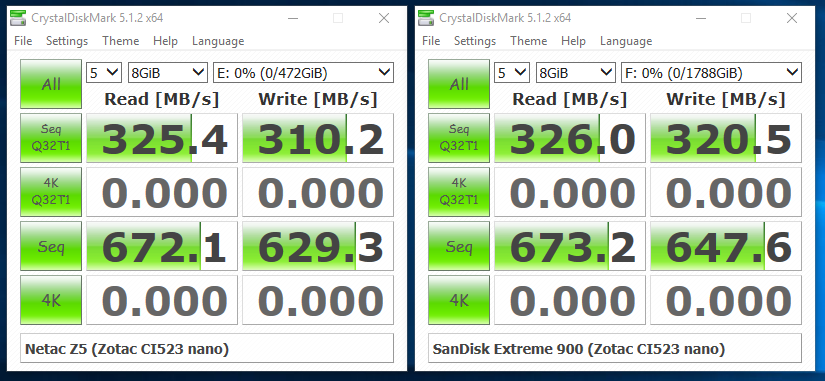
Compared to the x2 uplink that could support more than 800 MBps of traffic in the GIGABYTE BRIX, we see that the ZBOX is able to support only around 650 MBps.
In terms of scope for improvement, the uplink configuration for the ASM1142 bridge chip definitely needs to be revisited. It is not clear why a x1 link was chosen when there is no paucity of HSIO lanes from the PCH. Additionally, we would have liked a 1x Type-A + 1x Type-C configuration in the front panel for the two USB 3.1 Gen 2 ports, instead of the 2x Type-C that has been implemented by Zotac. On the topic of 'external features', a compact wall-wart adapter (similar to the one supplied with the Skylake-U NUCs) would be a better option compared to the power brick that is currently supplied with the unit.
On the memory and storage side, we are not going to complain about the DDR3L-only and 2.5" SATA drive-only restriction. The ZBOX CI523 nano is not meant to be a performance powerhouse like, say, the MAGNUS EN980 gaming PC. The restriction of the memory and storage choices to 'legacy' components ensures that the build can turn out to be an affordable one.
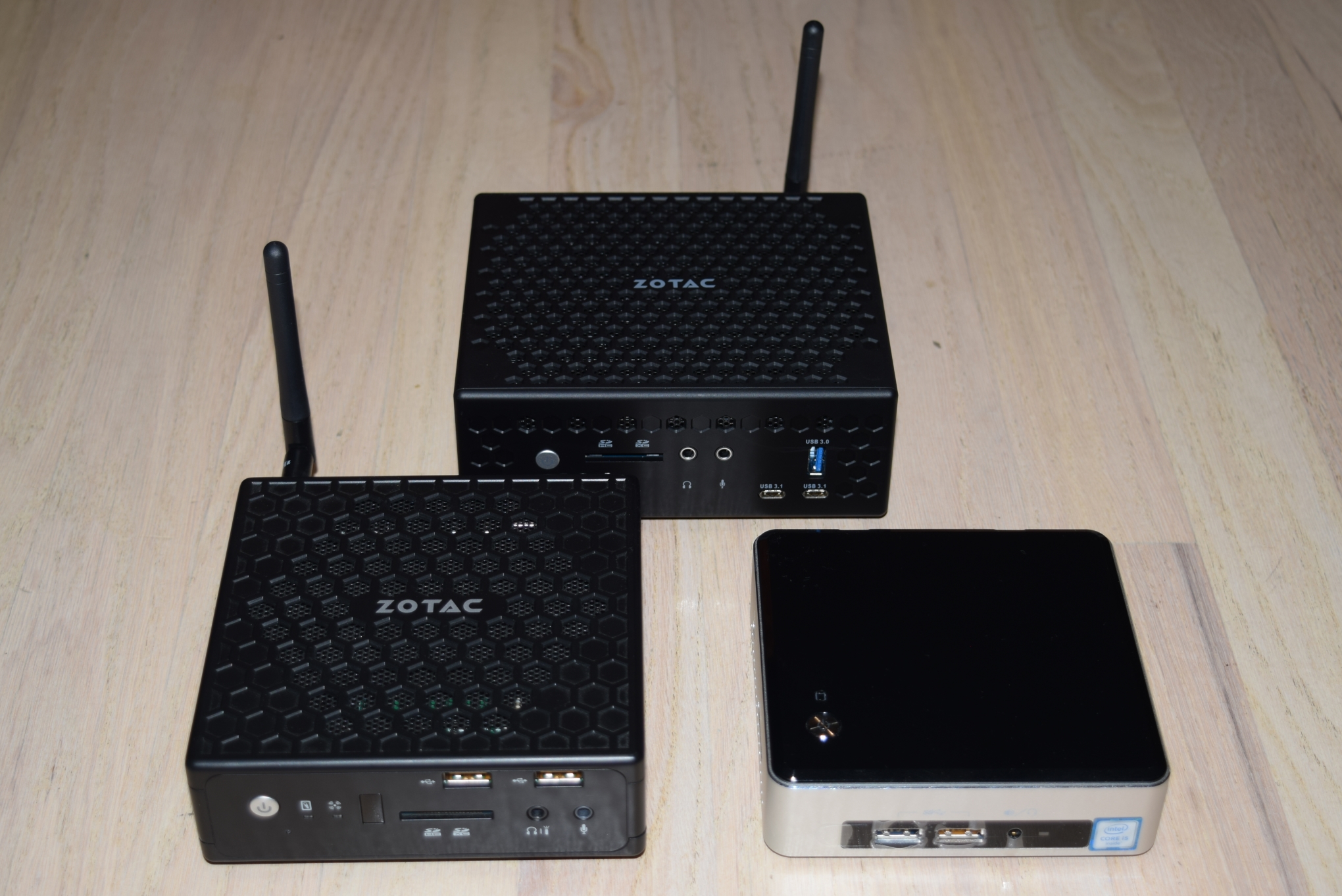
Zotac ZBOX CI523 nano (top) - Size comparison against the first-generation ZBOX C-series (bottom left) and the NUC6i5SYK (M.2 SSD only) (bottom right)
Zotac should also have a better and more user-friendly way to update the BIOS similar to Intel's method for the NUCs (a Windows executable can handle everything). Failing that, it could at least offer the ability to update the BIOS directly from the BIOS interface (by placing the BIOS update in a USB key and booting into the BIOS). Their current scheme involves using a DOS boot disk with the update loaded into it. This method is acceptable for power users, but not for Zotac's target market with the C-series PCs.
The Achilles heel of the ZBOX CI523 nano is its thermal design. Taken standalone, the various components - the honeycomb mesh chassis, the substantial heat sink, the metal plate and thermal pads for the user-replaceable RAM and 2.5" drive - make a very good set of building blocks for an effective fanless PC. Unfortunately, the whole turns out to be lesser than the sum of the parts. The full configuration is able to sustain a 15W load for only 10 minutes. The sustained load capacity of around 12W is lesser than the TDP of the Core i3-6100U used in the system. The presence of a metal plate at the bottom of the chassis is not really conducive for convective heat dissipation. In fact, it gets quite hot - more than 65C - even without significant loading on the components attached to it. The 2.5" drive heats up more than one would like because of this. The heat sink on top of the SiP covers the whole motherboard, but, there is no airflow from the bottom to the top to aid in the cool-down process. Fortunately, we at least have the mesh on top of the heatsink and lots of ventilation on at either side of it to alleviate the issues to a small extent. Zotac needs to definitely tweak the thermal design in order to be able to support sustained loading of a 15W TDP CPU in the system. We hope the next iteration / generation can fix this aspect.
The final aspect of discussion is the pricing - $320 on Amazon currently. Given the premium associated with fanless computing systems, it is not surprising to see the Zotac ZBOX CI523 nano priced $40 more than the corresponding Intel NUC6i3SYH. The price to performance ratio for the CI523 nano is praiseworthy when compared against other passively cooled PCs that we have evaluated over the last few years. The ZBOX is also able to provide two additional USB 3.1 Gen 2 Type-C ports, but loses out on the benefits from DDR4 and M.2 SSD support. These would appear to be fair trade-offs, but, we are a bit peeved that the Core i3-6100U in the CI523 nano can't operate at its maximum possible performance under sustained loading conditions. Given this drawback, achieving price parity with the NUC6i3SYH could be a reasonable way for Zotac to make the ZBOX CI523 nano more attractive to the consumers.
Originally published at https://www.anandtech.com/show/10724/zotac-zbox-ci523-nano-fanless-skylakeu-minipc-review (Wayback Machine).