
The Lenovo ThinkPad X1 Yoga Review: OLED and LCD Tested
Wireless Performance
There was a time when Intel wireless cards were better known for stability than speed, but now they can be known for both stability and speed. The Intel 8260 wireless adapter which has been in the latest Skylake notebooks has set some pretty lofty levels of performance. Lenovo has used the 8260 in the X1 Yoga, and to great effect. The one thing Intel has been missing is MU-MIMO, but it is arriving in the updated 8265 which we should see with Kaby Lake devices.
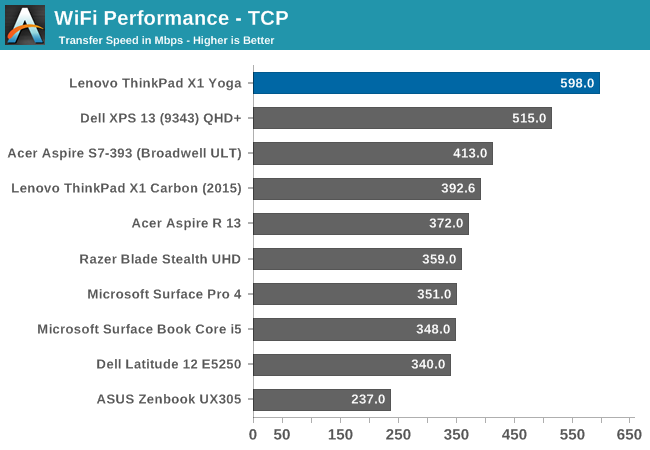
At about 600 Mpbs, the 8260 is one of the few wireless cards where I don’t feel the need to hook up to Ethernet for large file transfers. At the moment it’s going to be tough to compete against Intel right now with good driver support as well as top tier performance, which will be interesting with the new Dell XPS13 being announced with a Killer AC1535 WiFi solution.
Noise and Thermals
When you go thin and light, one drawback can be thermal load capability. This can be offset by good design, or loud fans. The latter is not something you really want in an Ultrabook. When performing light loads, the fan in the X1 Yoga appears to be turned off, even when the notebook is plugged in, which makes it silent at idle. When working, you can hear the fans ramp up, but they never get too loud, We measured the maximum SPL of the X1 Yoga, and it achieved 43.5 dB(A) when measured one inch over the trackpad.
To test the thermal capabilities, our Dota 2 test was run for the full duration of the match, which is about 40 minutes.

Thermals are a bit of an issue in a high demand task like gaming. The GPU frequency does fluctuate from 950 Mz to 900 MHz, but the SoC is rated up to 1.05 GHz on the GPU. The CPU also throttles quite a bit in order to keep the SoC temperature under 80°C.
Audio
The X1 Yoga features stereo speakers on the bottom of the notebook, which is not ideal for use on a desk, but once flipped around the speakers would be pointed towards the user. Maximum volume, measured one inch over the trackpad, was only around 80 dB(A). This, by comparison to other notebooks, is on the low end. There is not a lot of room in an Ultrabook for quality speakers, and even the loudest laptops struggle with any low frequencies, and the X1 Yoga is no exception. For conference calls and such, it would be fine, but for music a good set of headphones would be in order.
Originally published at https://www.anandtech.com/show/10697/the-lenovo-thinkpad-x1-yoga-review (Wayback Machine).