
GIGABYTE GB-BSi7HAL-6500 Dual LAN Skylake BRIX Review
Power Consumption and Thermal Characteristics
The power consumption at the wall was measured with a 1080p display being driven through the HDMI port. In the graphs below, we compare the idle and load power of the GIGABYTE GB-BSi7HAL-6500 with other low power PCs evaluated before. For load power consumption, we ran the AIDA64 System Stability Test with various stress components, as well as our custom stress test with Prime 95 and Furmark together, and noted the maximum sustained power consumption at the wall.
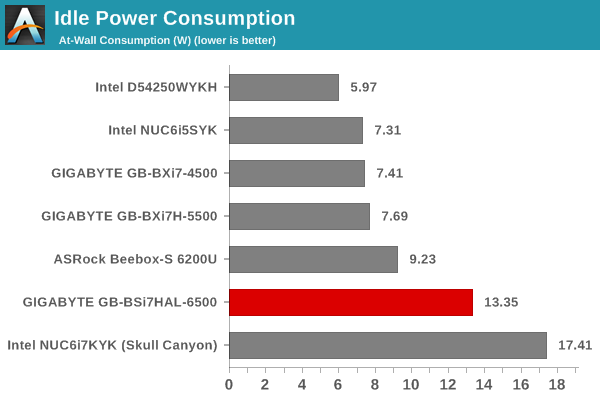
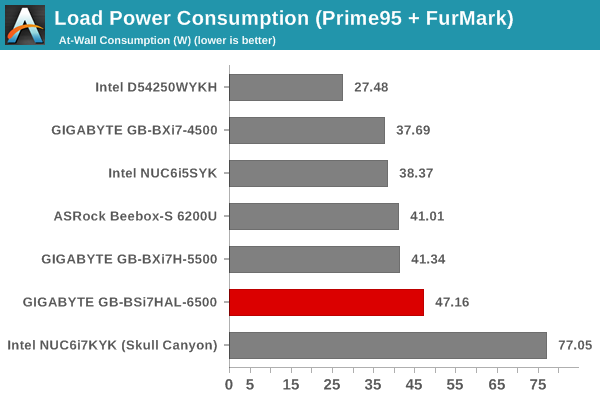
The GB-BSi7HAL-6500's power numbers are as per expectations, given the high-performance CPU and the configuration of the system with a PCIe 3.0 x4 NVMe SSD.
Our thermal stress routine starts with the system at idle, followed by four stages of different system loading profiles using the AIDA64 System Stability Test (each of 30 minutes duration). In the first stage, we stress the CPU, caches and RAM. In the second stage, we add the GPU to the above list. In the third stage, we stress the GPU standalone. In the final stage, we stress all the system components (including the disks). Beyond this, we leave the unit idle in order to determine how quickly the various temperatures in the system can come back to normal idling range. The various clocks, temperatures and power consumption numbers for the system during the above routine are presented in the graphs below. The temperature graph also shows the fan speed.


We also repeated the tests with our custom routine that loads up Prime 95 for 30 minutes, followed by Furmark for 30 minutes. The Prime 95 load is then removed, allowing just the GPU alone to be stressed for 30 minutes. The system is then left idle.


According to the official specifications, the junction temperature of the Core i7-6500U is 100C. The package temperatures are kept well below that in the AIDA64 system stability test, though our custom routine with both Prime95 and Furmark makes the package reach as much as 98C. However, there is no thermal throttling (just a slight dip in the package power consumption) as the core frequencies stay above the rate speed (2.5 GHz). The fan inside the chassis operates at 3000 RPM at default, and seems to be able to operate at either 6000 RPM when the system is heavily loaded, or, at 4000 RPM under moderate stress.
Originally published at https://www.anandtech.com/show/10689/gigabyte-gbbsi7hal6500-dual-lan-skylake-brix-review (Wayback Machine).