
The Corsair Carbide 600Q Case Review: Upside Down But Right On
- Posted in
- Cases/Cooling/PSUs
- Corsair
- ATX
- E-ATX
The Interior of the Corsair Carbide 600Q
The removal of the case’s panels reveals a simple but very interesting interior, with an inversed motherboard tray, meaning that the motherboard is literally upside down. Corsair based this design on the simple concept that the cool air sinks towards the bottom of the case, making the front and bottom fans more effective as intakes and the rear fan more effective as an exhaust. Furthermore, it allowed the designer to seal the top of the case, significantly improving its acoustics performance.

Cleverly, the designer moved the PSU compartment to the top of the case, putting it at the same height as the 5.25" drive bays. As the PSU is much shorter than other system components, such as the motherboard and long GPU cards, moving the PSU and drive bays above the motherboard allowed the designer to greatly shorten the case without having to worry about hardware compatibility problems.
With the exception of the cooling fan blades, everything inside the Carbide 600Q is black. The metallic parts are sprayed with the same satin black paint as with the exterior of the case, as are most of the plastic parts as well. The only exception is the cover of the PSU compartment, which has been treated with a matte varnish finish. One 140 mm intake and one 140 mm exhaust fan are pre-installed inside the Carbide 600Q, with one more 140 mm fan supplied as an extra.


There is a very large opening on the motherboard tray for the installation of aftermarket CPU coolers, so large that it will extend beyond the boundaries of a Flex-ATX or smaller motherboard. Only a full ATX or Extended ATX motherboard will fully cover the opening. Large openings with rubber grommet coverings for the routing of cables can be seen to the left and above the motherboard area. Two narrow but long openings can be seen below the motherboard, without any grommets installed.

Corsair moved all of the drives to the left side of the case, behind the motherboard tray. Two 3.5” drives can be installed in the slots found beneath the PSU compartment, on plastic trays. These plastic trays can also accommodate 2.5” drives, if required. Three plastic 2.5” drive cages can be seen directly behind the motherboard, allowing the quick and tool-less installation of devices.


To take a look at the case with a finished build inside it, we installed a Corsair AX760i with the red cable set, for strong visual contrast. The AX760i easily fits inside the PSU compartment of the Carbide 600Q, with plenty of room for managing the cables. There is also a massive 28 mm clearance behind the motherboard tray, allowing for the easy routing of cables. The distance between the PSU and the motherboard’s CPU power header is long though, and the EPS power cable could only reach our system’s connector via a straight line, going right above the installed 2.5” drive. Extenders will definitely be necessary for PSUs with shorter cables.
The system area of the Carbide 600Q is very spacious considering the volume of the case. There is a significant clearance between the motherboard and the bottom of the case, allowing for the installation of liquid cooling radiators. We would recommend not installing radiators wider than 30 mm, as they could interfere with the motherboard’s components. The space in front of the motherboard allows for cards up to 370 mm long to the installed, but this distance will be shortened if there is a liquid cooling radiator installed at the front of the case. Users who prefer air coolers should not have to worry, as the case is very wide and there is a significant clearance between the CPU area and the bottom of the case, allowing compatibility with nearly all of the air coolers currently available.
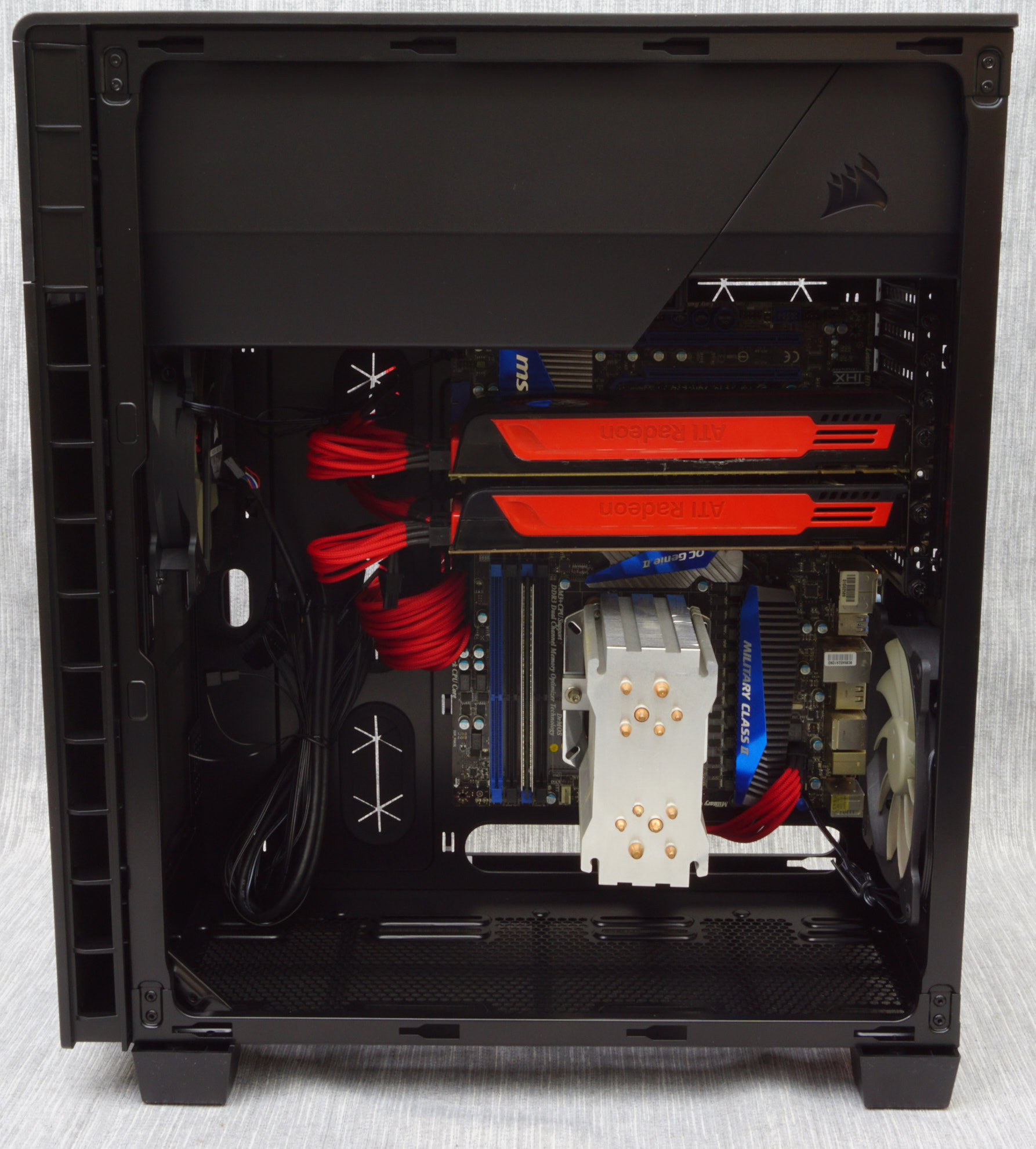
One minor problem about the Carbide 600Q, but one that users checking the windowed 600C version should definitely consider, is that nearly all of the modern hardware has been aesthetically designed with normal orientation in mind. The inverse design will cause designs, logos, and labels to be upside down, much like it does for the chipset heatsink and the GPU cooler labels of our showcase system. This is of no real consequence inside the opaque 600Q, but it will be a serious aesthetics issue for modders trying to build a visually pleasing system inside the windowed 600C.

Originally published at https://www.anandtech.com/show/10650/the-corsair-carbide-600q-case-review (Wayback Machine).