
Windows XP Media Center Edition: Exposed
- Posted in
- Systems
A Remote Controlled PC
Although all Media Center PCs ship with a keyboard and mouse, the preferred method of controlling the Media Center interface is via remote; after all, who wants to flip channels with a keyboard?

Microsoft left the OEMs up to design and implement their own remote controls, so they will vary from one Media Center PC to the next. For this test we used HP’s remote (above), which is a little over 8” long and about 2” wide. The buttons have good tactile feel and the remote itself feels just like any home theater remote, albeit a bit skinnier than most (see it compared to a standard Toshiba TV remote below).

The remote communicates with its receiver using an infrared signal, which does require line of sight between the remote and the receiver itself. The HP remote in particular is relatively good at not being too directional, although it's not as flexible as ATI's Remote Wonder that uses radio frequency to communicate.
The receiver itself carries a USB 1.0 interface, which is all that is necessary considering the limited amount of data that is sent between the receiver and the system itself. The remote essentially sends keystroke combinations to the receiver over IR which are then sent directly to the system, definitely not enough to saturate the 11Mbps USB 1.0 interface at all.
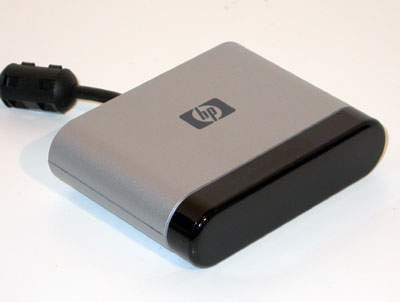
The HP IR Receiver
The receiver has two 1/8" outputs for IR blasters; which are necessary if you're using a set-top cable box. The IR blaster works just like any other, the remote sends its signals to the receiver which then retransmits the channel switching to the cable box. Because of the additional step, switching channels with a cable box/IR blaster takes longer than usual but that's to be expected.
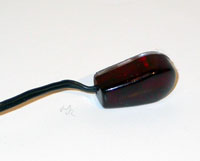
IR Blaster
It is worth noting that there is no serial connection on the HP receiver for a direct connection to a cable box. Some PVRs offer a serial link to a cable box in order to avoid using an IR blaster, which makes switching channels much quicker. Not having a serial link in this case would be a huge drawback for cable box users, although it is something that is potentially fixable. We haven’t seen any designs that support a serial link to an external cable box but there’s nothing stopping a manufacturer from doing so.
The software side of the remote is fairly simple; a single driver is all that's necessary to get the receiver up and running, then a quick setup through MCE will ensure the remote is working properly. The remote is functional outside of MCE but it cannot be used as a mouse replacement like ATI's Remote Wonder; the directional pad can't be used to move your pointer around.
Originally published at https://www.anandtech.com/show/1051 (Wayback Machine).