
AKiTiO Thunder3 PCIe SSD Thunderbolt DAS Review
Direct-Attached Storage Performance
The Thunder3 PCIe SSD was formatted in exFAT before being subject to our benchmarking routine. In order to evaluate the DAS aspect of the unit, we utilized the testbed outlined in the table below to test the performance.
| AnandTech DAS Testbed Configuration | |
| Motherboard | GIGABYTE Z170X-UD5 TH ATX |
| CPU | Intel Core i5-6600K |
| Memory | G.Skill Ripjaws 4 F4-2133C15-8GRR 32 GB ( 4x 8GB) DDR4-2133 @ 15-15-15-35 |
| OS Drive | Samsung SM951 MZVPV256 NVMe 256 GB |
| SATA Devices | Corsair Neutron XT SSD 480 GB Intel SSD 730 Series 480 GB |
| Add-on Card | None |
| Chassis | Cooler Master HAF XB EVO |
| PSU | Cooler Master V750 750 W |
| OS | Windows 10 Pro x64 |
| Thanks to Cooler Master, GIGABYTE, G.Skill and Intel for the build components | |
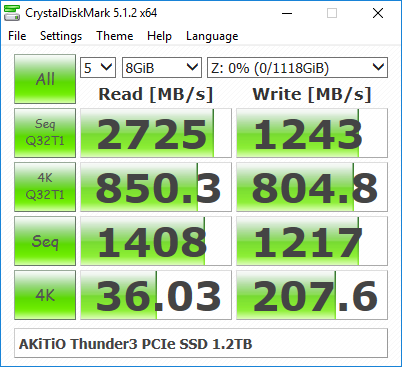
Our testing methodology for DAS units takes into consideration the usual use-case for such devices. The most common usage scenario is transfer of large amounts of photos and videos to and from the unit. The other usage scenario (particularly for multimedia-editing professionals that are the target market for the Thunder3 PCIe SSD) is importing files directly off the DAS into a multimedia editing program such as Adobe Photoshop. Prior to taking a look at the real-life benchmarks, we first check what ATTO and CrystalDiskMark have to report for the Thunder3 PCIe SSD. We see numbers around 2500 MBps for sequential transfers, correlating well with AKiTiO's performance claims.

In order to tackle the first real-life use-case, we created three test folders with the following characteristics:
- Photos: 15.6 GB collection of 4320 photos (RAW as well as JPEGs) in 61 sub-folders
- Videos: 16.1 GB collection of 244 videos (MP4 as well as MOVs) in 6 sub-folders
- BR: 10.7 GB Blu-ray folder structure of the IDT Benchmark Blu-ray (the same that we use in our robocopy tests for NAS systems)
| AKiTiO Thunder3 PCIe SSD 1.2TB robocopy Benchmarks (MBps) | ||
| Write Bandwidth | Read Bandwidth | |
| Photos | 494.17 | 718.58 |
| Videos | 669.56 | 1444.75 |
| Blu-ray Folder | 747.16 | 1484.67 |
For the second use-case, we take advantage of PC Mark 8's storage bench. The storage workload involves games as well as multimedia editing applications. The command line version allows us to cherry-pick storage traces to run on a target drive. We chose the following traces.
- Adobe Photoshop (Light)
- Adobe Photoshop (Heavy)
- Adobe After Effects
- Adobe Illustrator
Usually, PC Mark 8 reports time to complete the trace, but the detailed log report has the read and write bandwidth figures which we present in our performance graphs. Note that the bandwidth number reported in the results don't involve idle time compression.
| AKiTiO Thunder3 PCIe SSD 1.2TB PCMark8 Storage Benchmarks (MBps) | ||
| Write Bandwidth | Read Bandwidth | |
| Adobe Photoshop (Light) | 1590.58 | 307.38 |
| Adobe Photoshop (Heavy) | 1425.8 | 337.42 |
| Adobe After Effects | 826.43 | 333.66 |
| Adobe Illustrator | 1343.64 | 321.70 |
Some context to the above numbers can be gathered from our last DAS review with the benchmark numbers presented using graphs. Given that the PCIe SSD simply leaves those USB drives in the dust, and the fact that the interface is different, we decided it would not be an apples-to-apples comparison if the numbers were to be presented / compared in the same set of graphs.
Originally published at https://www.anandtech.com/show/10396/akitio-thunder3-pcie-ssd-thunderbolt-das-review (Wayback Machine).