
The Zalman Z9 Neo Case Review
- Posted in
- Cases/Cooling/PSUs
- Zalman
- ATX
- Case
The Interior of the Zalman Z9 Neo
Even in the white version, the interior of the Zalman Z9 Neo is all black, including all of the cables. The motherboard stand-offs are bronze and the blades of the front and rear cooling fans are white. The matte black paint that the chassis is sprayed with is not highly prone to fingermarks, but not resistant either. A large opening on the motherboard tray allows for the installation of aftermarket CPU coolers without having to remove the motherboard from the case. Zalman extended the opening to the boundaries of a flex ATX motherboard, maximizing compatibility, but the opening will not be fully covered if a Mini ITX motherboard is installed.
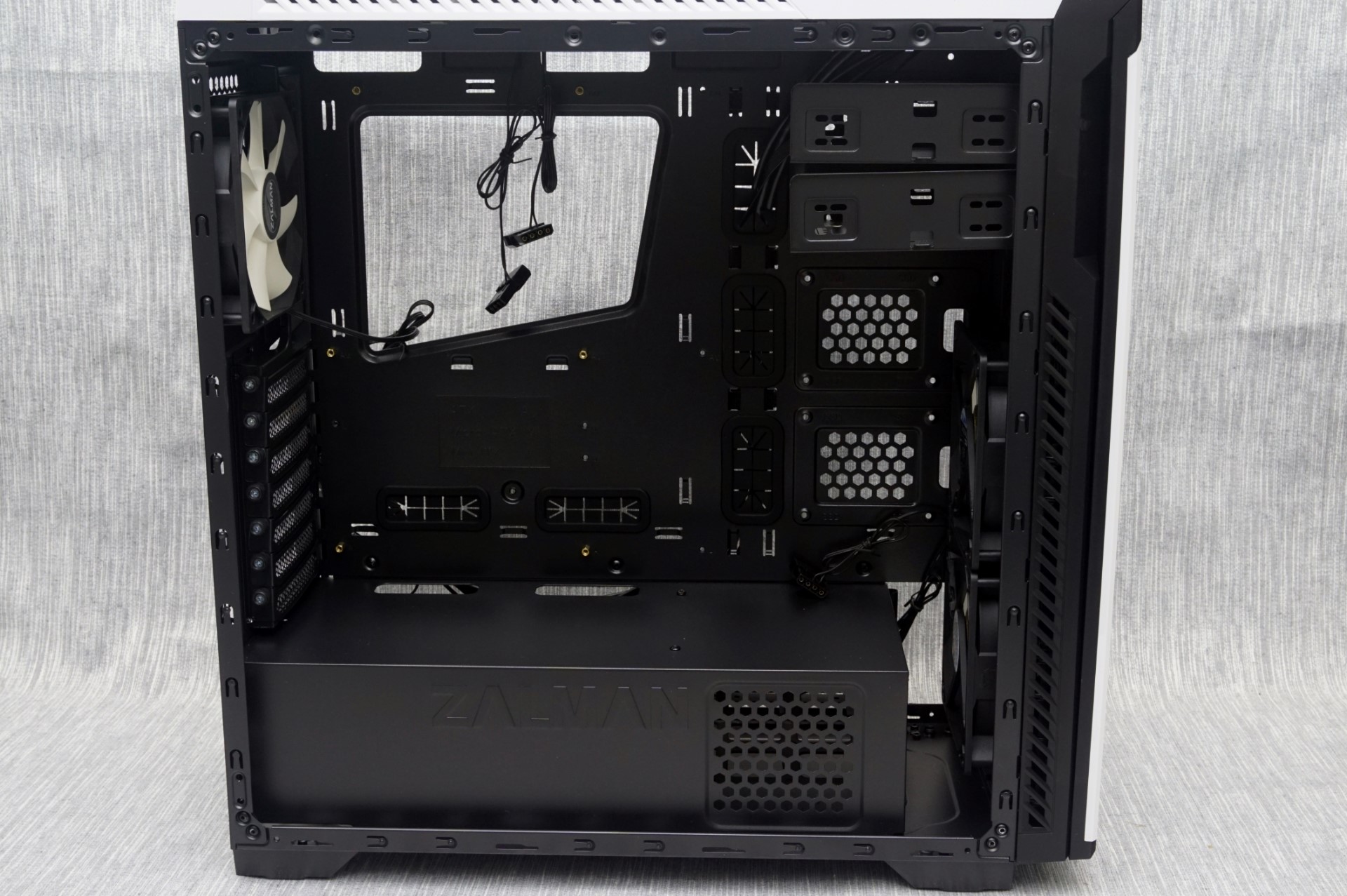

Numerous openings for the routing of cables are present along the edges of the motherboard. Strangely, those to the right and the bottom of the motherboard are covered with rubber grommets, but those above the motherboard are not, even though their size is identical to those below the motherboard. Zalman probably thought that these are too high to be visible from the windowed side panel. A metallic cover with the company logo punched on it separates the main system from the PSU compartment. Two more openings can be seen on this cover, again without rubber grommets. The cover is not removable.

Drive support is a little complex. Zalman claims that the Zalman Z9 Neo can hold two 5.25” drives, four 3.5” drives and six 2.5” drives. This is partially accurate, with the correct definition being “up to” that number of drives. Two 2.5” drives can be attached directly on the motherboard’s tray, beneath the 5.25” cages. Two 3.5” or two 2.5” drives can be installed into the plastic trays in front of the PSU area. Finally, two 5.25” drives or two 3.5” drives or two 2.5” drives can be installed onto the 5.25” drive cages.
The plastic trays that Zalman chose for the 2.5”/3.5” drive cage are somewhat oversized, with a plastic bumper in front of the drive. 3.5” drives can lock without tools but 2.5” drives will have to be attached with screws.

It is also interesting to note that the 5.25” drive cages are removable. By default, their position cannot really block and long cards or large coolers, but we believe that modders will appreciate the function.
A look at the top of the case reveals two clear blue LED fans, bringing the stock number of fans that the Zalman Z9 Neo comes with up to five. There is also a lot of clearance above the motherboard, allowing the comfortable installation of liquid cooler radiators up to 28 mm thick.

For the means of this review, we installed a Corsair AX760i with the red cable set, for strong visual contrast. The AX760i fits like a glove inside the Zalman Z9 Neo, with enough room for managing the cables. The cables are also more than long enough for a typical system. With a full 2.2 cm clearance at the back of the motherboard, numerous cable tie points and cable straps across the side grommets, cable management should be a breeze even for amateurs.

A standard ATX system fits inside the system area of the Zalman Z9 Neo with relative comfort. There is a long of space in front of the motherboard, allowing cards up to 420 mm long to the installed. Very long cards will block access to the 2.5” drive slots, forcing the user to remove the card(s) if the 2.5” drives need to be removed/installed there. Our only concern is that the case is rather narrow, limiting the height of the CPU cooler up to 160 mm. Although this is enough for the majority of mainstream aftermarket coolers, it negates compatibility with nearly every top tier air cooler currently available. Other than that, the Zalman Z9 Neo is relatively spacious for a case of its size, allowing the installation of top tier hardware and AIO liquid cooling solutions.

Originally published at https://www.anandtech.com/show/10317/the-zalman-z9-neo-case-review (Wayback Machine).