
Drobo 5D with BeyondRAID - Protected Direct-Attached Storage Made Simple
- Posted in
- Storage
- USB 3.0
- DAS
- Drobo
- BeyondRAID
Direct-Attached Storage Performance
Evaluation of DAS units on Windows is done with the testbed outlined in the table below. We had started evaluation with the older Haswell-based testbed, since it has Thunderbolt 2 support. Eventually, we learnt during the course of evaluation that the Drobo 5D's Thunderbolt ports are useless when the unit is used with PCs / Windows. Despite this, we continued and completed our evaluation using the USB 3.0 interface on the same testbed. We utilize the USB 3.0 port directly from the Z97 PCH.
| AnandTech DAS Testbed Configuration | |
| Motherboard | Asus Z97-PRO Wi-Fi ac ATX |
| CPU | Intel Core i7-4790 |
| Memory | Corsair Vengeance Pro CMY32GX3M4A2133C11 32 GB (4x 8GB) DDR3-2133 @ 11-11-11-27 |
| OS Drive | Seagate 600 Pro 400 GB |
| SATA Devices | Asus BW-16D1HT 16x Blu-ray Write (w/ M-Disc Support) |
| Add-on Card | Asus Thunderbolt EX II |
| Chassis | Corsair Air 540 |
| PSU | Corsair AX760i 760 W |
| OS | Windows 10 Pro x64 |
| Thanks to Asus and Corsair for the build components | |
The full details of the reasoning behind choosing the above build components can be found here. The list of Drobo 5D configurations used for comparison purposes is provided below.
- Drobo 5D SDR Yes mSATA (Single disk redundancy with mSATA acceleration)
- Drobo 5D SDR No mSATA (Single disk redundancy without mSATA acceleration)
- Drobo 5D DDR Yes mSATA (Dual disk redundancy with mSATA acceleration)
- Drobo 5D DDR No mSATA (Dual disk redundancy without mSATA acceleration)
Synthetic Benchmarks - ATTO and Crystal DiskMark
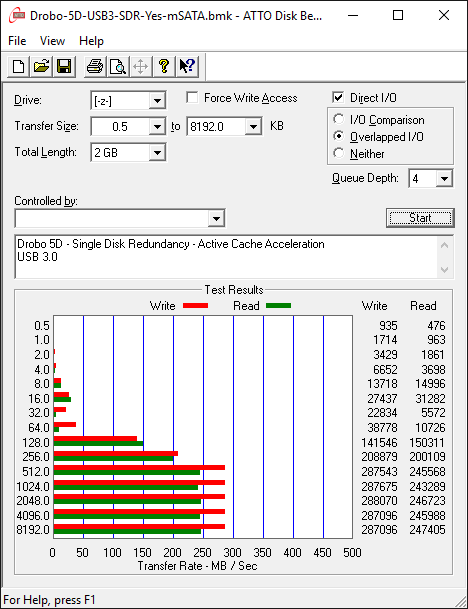
The Drobo 5D delivers best-case numbers of close to 300 MBps writes and 250 MBps reads in the single-disk / mSATA inactive configuration for our standard ATTO benchmarking configuration. Obviously, the benefits of mSATA acceleration don't come out in this quick-and-dirty benchmark. However, we can see that dual-disk redundancy solutions fare a little worse compared to the single-disk redundancy solutions.In any case, these access traces are not very common in real-life scenarios.
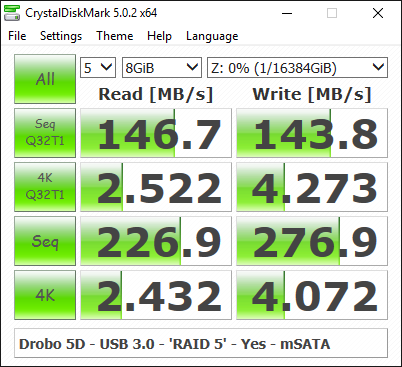
CrystalDiskMark, despite being a canned benchmark, provides a better estimate of the performance range with a selected set of numbers. In this case, we can see the sequential access numbers back up the ATTO results. Random access numbers are quite decent for a hard-drive array.
Benchmarks - robocopy and PCMark 8 Storage Bench
Our testing methodology for DAS units also takes into consideration the usual use-case for such devices. The most common usage scenario is transfer of large amounts of photos and videos to and from the unit. Devices like the Drobo 5D are often used to import files directly off the DAS into a multimedia editing program such as Adobe Photoshop.
In order to tackle the first use-case, we created three test folders with the following characteristics:
- Photos: 15.6 GB collection of 4320 photos (RAW as well as JPEGs) in 61 sub-folders
- Videos: 16.1 GB collection of 244 videos (MP4 as well as MOVs) in 6 sub-folders
- BR: 10.7 GB Blu-ray folder structure of the IDT Benchmark Blu-ray (the same that we use in our robocopy tests for NAS systems)
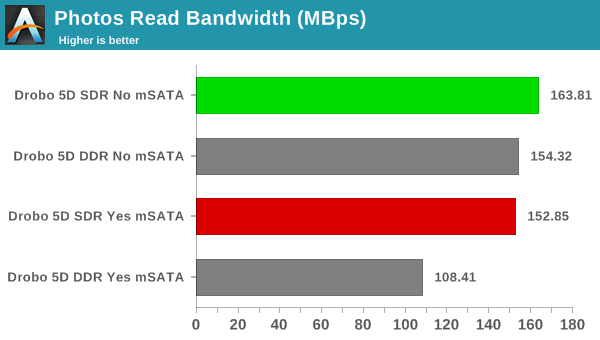
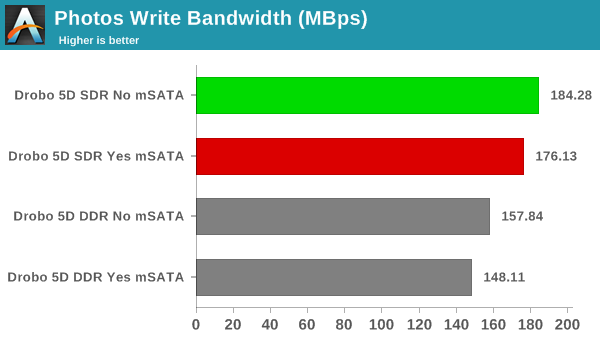
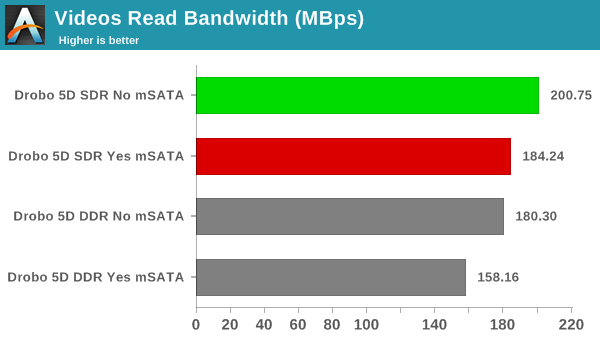
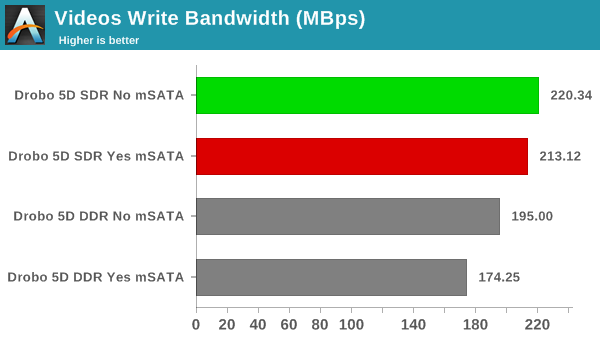
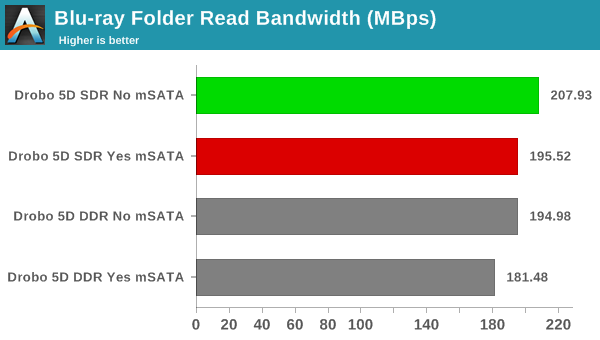
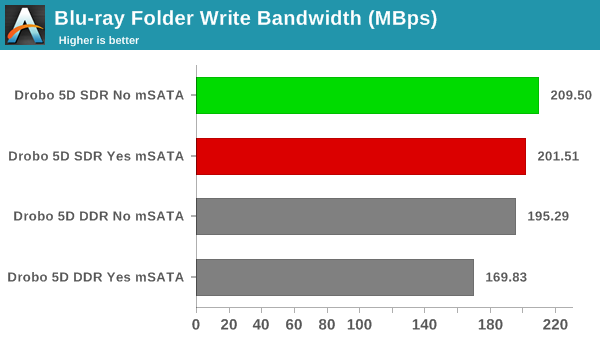
In all the above benchmarks, we see that the mSATA cache acceleration is not useful at all (we are testing out a one-time copy of data to and from the unit). The single-disk redundancy configuration consistently performs better than the dual-disk redundancy option.
For the second use-case, we take advantage of PC Mark 8's storage bench. The storage workload involves games as well as multimedia editing applications. The command line version allows us to cherry-pick storage traces to run on a target drive. We chose the following traces.
- Adobe Photoshop (Light)
- Adobe Photoshop (Heavy)
- Adobe After Effects
- Adobe Illustrator
Usually, PC Mark 8 reports time to complete the trace, but the detailed log report has the read and write bandwidth figures which we present in our performance graphs. Note that the bandwidth number reported in the results don't involve idle time compression. Results might appear low, but that is part of the workload characteristic.
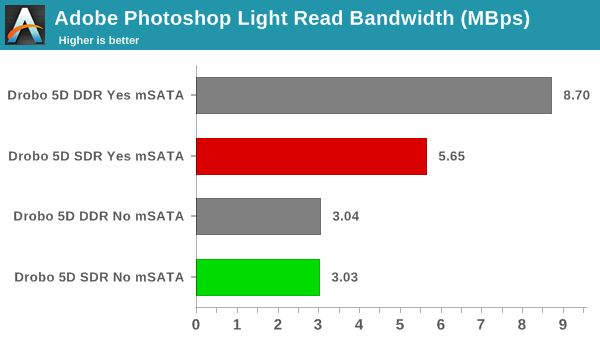
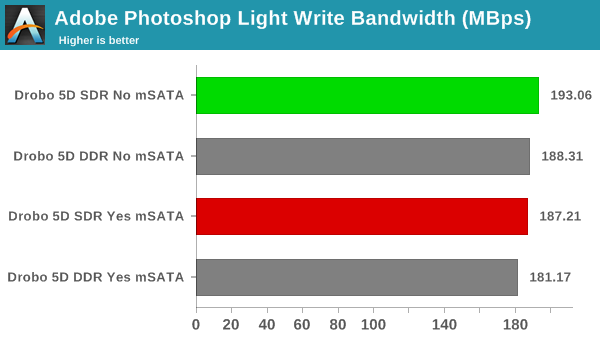
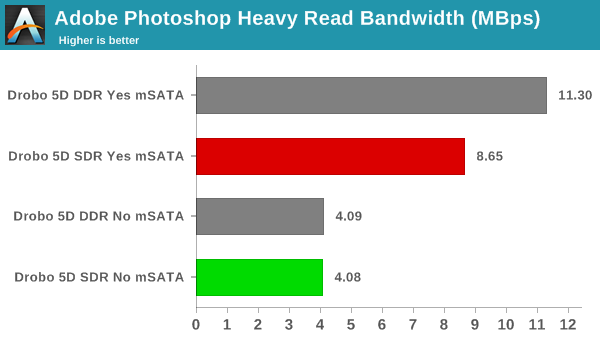
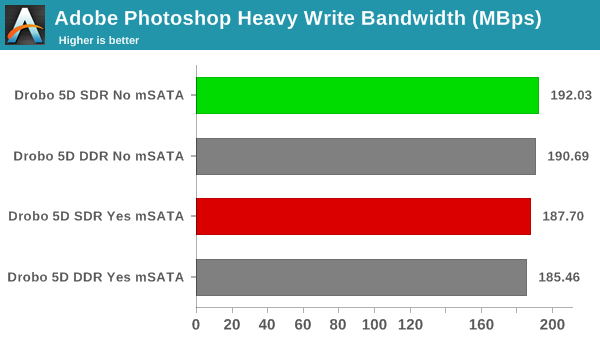
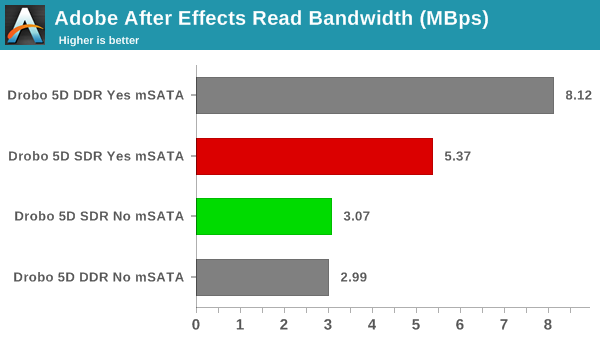
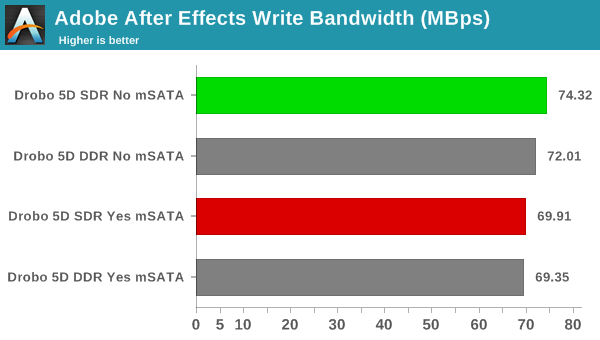
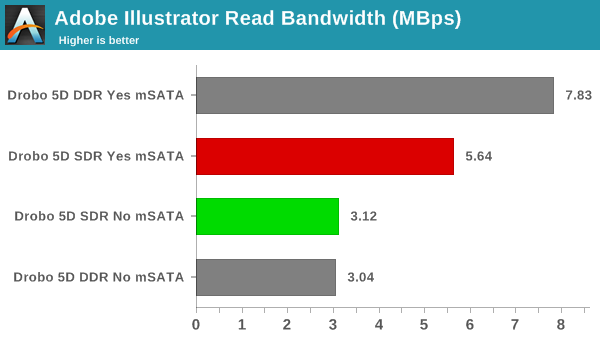
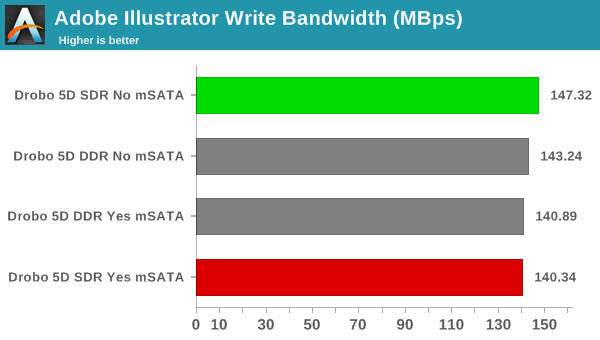
In the real-world work traces, we can see the real benefit of the mSATA SSD cache acceleration. Writes don't benefit much, but, in the read workloads, we can see that the mSATA SSD-enabled configurations often provide almost double the performance of a raw hard-drive array.
Originally published at https://www.anandtech.com/show/10278/drobo-5d-with-beyondraid-protected-directattached-storage-made-simple (Wayback Machine).