
The Dell XPS 15 9550 Review: Infinity Edge Lineup Expands
Battery Life and Charge Time
The XPS 15 is available with two battery sizes. If you opt for the base model, it comes with a 2.5” SATA drive and a 56 Wh battery. If you opt for a device with the M.2 SSD, the extra space taken up by the 2.5” drive is replaced with more battery cells, giving you 84 Wh of capacity. It also adds about 0.5 lbs of weight to the device, but if you are going to be working away from an outlet, the SSD model should give much better battery life.
But, with the high resolution display, and wider color gamut, battery life is going to take a hit compared to something with a more traditional display. Since Dell sent us the UHD model, that’s the one we have to test.
To test battery life we have two tests. The light test involves light web browsing, with the display set to 200 nits brightness. The heavy test increases the pages loaded by the browser, adds a 1 MB/s file download, and includes movie playback. All testing is done with Edge as the browser.
Light Battery
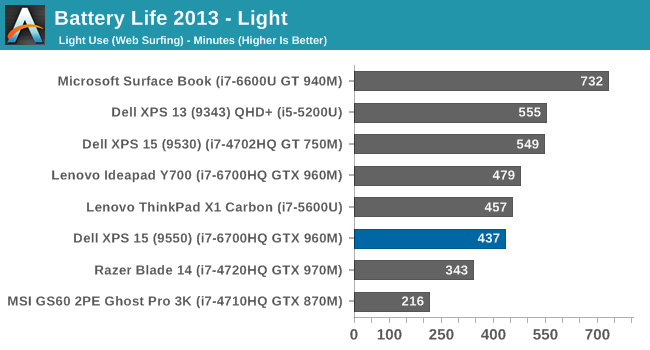
The XPS 15, with its quad-core CPU and high resolution display, can’t keep up with the best devices for battery life, even on light usage. At just under 7.5 hours, it is well under the XPS 13 and Surface Book results, despite the larger battery. It is also below the XPS 15 9530 results, and that device has a 91 Wh battery and 3200x1800 display.
Heavy Battery
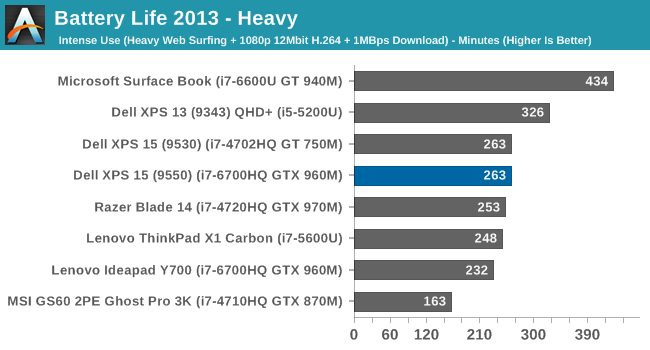
With the extra CPU workload, as well as constant network use, the battery life falls to just 4:23. This is exactly the same as the XPS 15 9530 score, so there is certainly some more efficiency because the display is higher resolution and the battery is slightly smaller on the new 9550 model. It’s still not a great result though.
Normalized Battery
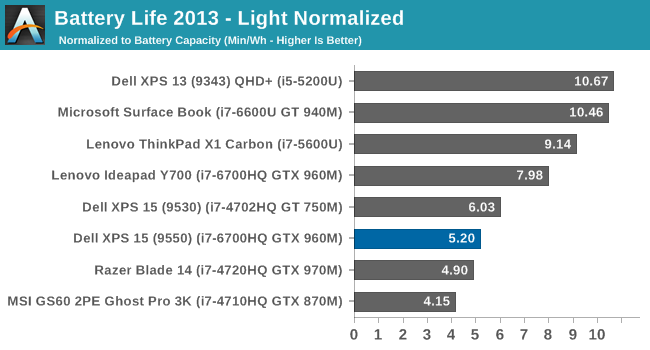
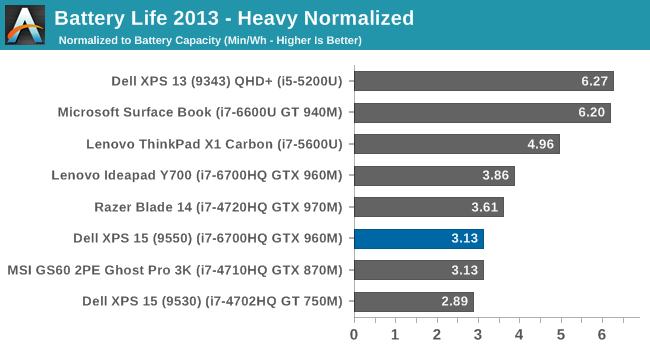
By removing the battery size from the equation, we can get an overall feel for platform efficiency. The XPS 15, despite the higher resolution display, does outperform the XPS 15 9530 on the heavy results, but the UHD display certainly hurts it compared to other devices. The Surface Book with discrete GPU is over double the efficiency, but with a dual-core processor. The Lenovo Y700 has the same processor and GPU, but a much lower resolution display, and it comes out quite a bit ahead of the XPS 15. For those that are normally plugged in, the UHD display is fantastic, but be warned, it’s a big hit on battery life.
Charge Time
The other side of battery life is how long it takes to charge. With an 84 Wh battery, this is a significant amount of capacity to top up. Luckily Dell ships the XPS 15 with a 130-Watt power adapter.
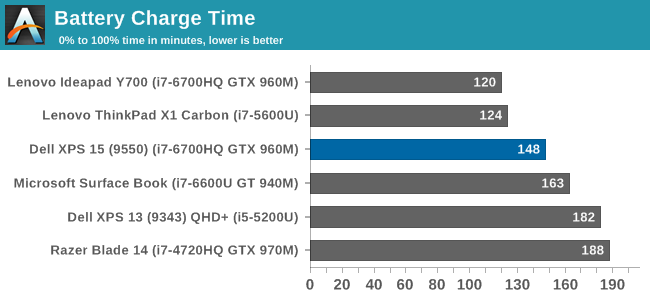

At 148 minutes, the XPS 15 charges very quickly. At least with the less than stellar battery life, once you do plug it in, it gets back on its feet pretty quickly.
Originally published at https://www.anandtech.com/show/10116/the-dell-xps-15-9550-review (Wayback Machine).